
UCaaS vs. PaaS: Which Cloud Model is Right for Your Business Infrastructure?

UCaaS vs. PaaS: Which Cloud Model Is Right for Your Business Infrastructure?
Choosing a cloud model sounds simple until you see the acronyms. SaaS, IaaS, PaaS, UCaaS, CPaaS: the list keeps growing, and each term promises to make your business faster, cheaper, and more flexible. Two of the most commonly confused options are UCaaS and PaaS. They both live in the cloud, and they both reduce the need for on-site hardware. Beyond that, they solve very different problems.
If your team struggles with scattered phone systems, patchy video calls, and too many messaging apps, you have a communication problem. If your developers need a place to build, test, and launch software without managing servers, you have a development problem. Mixing up the two can lead to wasted budget, frustrated staff, and months of rework.
This guide explains what each model does, where they differ, and how to decide which one belongs in your business infrastructure. By the end, you will have a clear framework for making the choice with confidence.
What Is UCaaS?
UCaaS stands for Unified Communications as a Service. It is a cloud-based delivery model that brings your business communication tools together in a single platform, hosted and maintained by a provider. Instead of buying a physical phone system (often called a PBX) and separate tools for meetings and chat, you subscribe to one service that covers everything.
A typical UCaaS platform includes:
- Business voice calling (VoIP) with features such as auto-attendants, call forwarding, and voicemail-to-email
- Video conferencing for internal meetings and client calls
- Team messaging and chat with channels, file sharing, and presence indicators
- Contact center features such as call routing and basic analytics, depending on the provider
- Mobile and desktop apps so employees can work from the office, home, or on the road
The main appeal of UCaaS is simplicity. The provider handles software updates, uptime, security patches, and infrastructure. Your employees log in and start communicating. Well-known providers in this space include Microsoft Teams Phone, Zoom Workplace, RingCentral, 8×8, and Cisco Webex, though the market is much larger than these names.
UCaaS is mainly designed for end users. Receptionists, sales teams, managers, and support agents are the people who benefit most. It requires very little technical skill to operate, which makes it a strong fit for companies without large IT departments.
What Is PaaS?
PaaS stands for Platform as a Service. Here, the provider delivers a cloud environment where developers can build, run, and manage applications without worrying about the underlying servers, storage, or networking. Think of it as a ready-made workshop: the tools, power, and workbenches are already in place, and your developers only bring the project.
A typical PaaS offering includes:
- Application hosting and runtime environments for languages such as Python, Java, Node.js, and .NET
- Databases and storage that scale as your data grows
- Development tools such as version control integrations, testing frameworks, and CI/CD pipelines
- Middleware and APIs that help applications talk to each other
- Monitoring and auto-scaling that adjust resources based on demand
Popular examples include Google App Engine, Microsoft Azure App Service, AWS Elastic Beanstalk, Heroku, and Red Hat OpenShift.
Unlike UCaaS, PaaS is built for developers and technical teams. It does not give your employees a ready-to-use phone system or meeting tool. It gives your engineers the foundation to create custom software, including customer portals, internal tools, mobile app backends, and even their own communication features.
UCaaS vs. PaaS: The Core Differences
The easiest way to separate the two is to ask one question: are you buying a finished tool, or are you buying a place to build one?
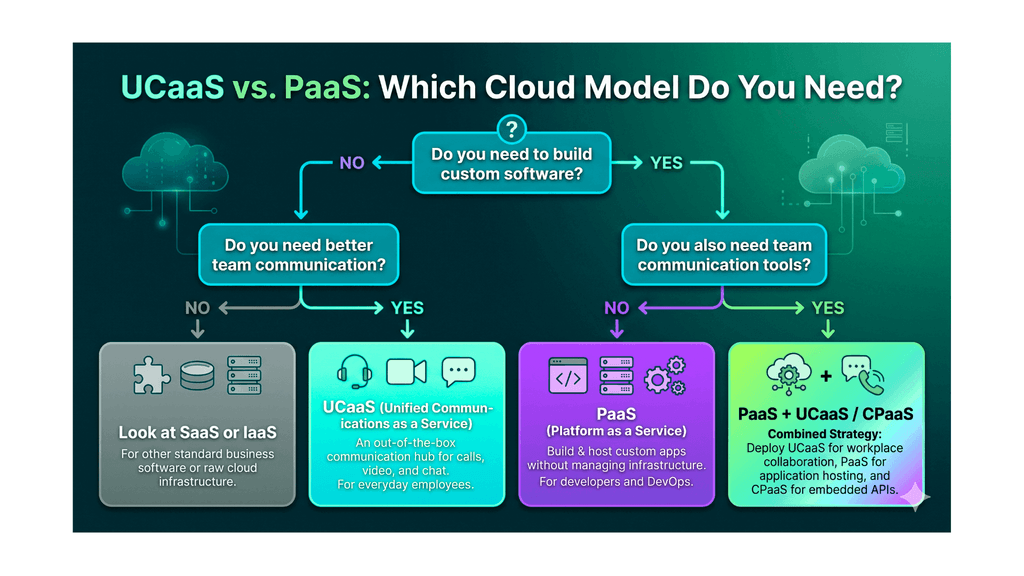
UCaaS is a finished product. PaaS is a foundation. The table below summarizes the major differences.
| Factor | UCaaS | PaaS |
| Primary purpose | Business communication | Application development and deployment |
| Main users | Employees, support teams, managers | Developers, DevOps engineers |
| Technical skill needed | Low | Medium to high |
| Customization | Limited to provider settings and integrations | Very high; you control the application code |
| Setup time | Days to weeks | Weeks to months, depending on the project |
| Pricing model | Per user, per month | Usage-based (compute, storage, bandwidth) |
| Provider manages | The full communication stack | Servers, OS, and runtime; not your code |
| Best for | Replacing legacy phone systems, supporting remote teams | Building custom software and digital products |
In short, UCaaS helps people talk to each other, while PaaS helps developers build things.
Cost Comparison: Predictable vs. Variable
Budget is often the deciding factor, so it is worth looking at how each model charges you.
UCaaS pricing is usually simple. Most vendors charge a flat monthly fee per user, with tiers based on features. You might pay a lower rate for basic calling and messaging, and a higher rate for video, analytics, and contact center tools. This makes forecasting easy. If you have 50 employees, you can estimate your yearly spend with little effort. Watch for add-on costs such as international calling, additional phone numbers, and premium support.
PaaS pricing is more variable. Providers typically charge based on how much you use: compute hours, memory, storage, data transfer, and sometimes the number of requests. This pay-as-you-go approach is efficient for startups and growing businesses because you only pay for what you consume. However, it can create surprises. A sudden traffic spike or an inefficient application can push your monthly bill well above expectations.
There is also a hidden cost to consider with PaaS: talent. Building on a platform requires skilled developers, and their salaries often exceed the platform fees. With UCaaS, the people cost is much lower because the service works out of the box.
1.Scalability and Flexibility
Both models scale well, but in different ways.
With UCaaS, scaling means adding or removing users. Hiring ten new sales representatives? Add ten licenses and they can start calling the same day. Opening a new office in another country? Most providers can support local numbers with minimal hardware. This is ideal for businesses with seasonal staffing or fast hiring cycles.
With PaaS, scaling means adding computing power and capacity to your applications. If your app suddenly goes viral, the platform can automatically allocate more resources to keep it running. That flexibility is powerful, but it depends on how well your application is designed. A poorly built app will not scale smoothly just because the platform can.
When it comes to flexibility, PaaS wins. You can shape your software in almost any direction. UCaaS, by contrast, limits you to the features the provider offers, although many platforms now include open APIs and integrations with tools such as Salesforce, HubSpot, and Slack.
2. Security and Compliance
Security should never be an afterthought, and the responsibilities differ between the two models.
In a UCaaS environment, the provider carries most of the security burden. This usually includes encryption for calls and messages, network protection, redundancy, and regular updates. Many providers also support compliance frameworks such as HIPAA, GDPR, SOC 2, and ISO 27001. Your job is to manage user access, set strong passwords, enable multi-factor authentication, and review the provider’s compliance documentation.
In a PaaS environment, security is shared. The provider secures the platform, including the physical data centers, network, and operating systems. You are responsible for the security of your application code, data handling, access controls, and configuration. A vulnerable app can expose customer data even when the platform itself is safe.
For regulated industries such as healthcare, finance, and legal services, both models can work. What matters is choosing a vendor that signs the right agreements (such as a Business Associate Agreement for HIPAA) and clearly documents where your data is stored.
3. Integration and Management
A cloud model is only valuable if it fits into your existing systems.
UCaaS platforms are built to integrate with business applications. You can connect your calling system to a customer relationship management (CRM) tool so every call is logged automatically. You can link your calendar to schedule video meetings in one click. Most modern providers offer pre-built integrations, which cuts setup time significantly.
PaaS integrates differently. Because it is a development environment, you decide how to connect your applications with other services using APIs, webhooks, and custom code. This offers more freedom, but it also demands more planning and technical effort.
On the management side, UCaaS needs very little day-to-day attention. An IT administrator may add users, adjust call flows, and check reports. PaaS requires ongoing engineering work: deploying updates, fixing bugs, monitoring performance, and optimizing costs.
When UCaaS Is the Right Choice
UCaaS makes sense when your main goal is better communication across your team and with your customers. Consider it if:
- You still use a traditional PBX or landline system that is expensive to maintain or hard to expand.
- Your workforce is remote or hybrid, and you need consistent calling, messaging, and video on every device.
- You lack a large IT team and want a provider to handle maintenance and upgrades.
- You want predictable monthly costs with simple per-user pricing.
- You are growing quickly and need to onboard new employees without buying hardware.
A mid-sized accounting firm with three offices is a good example. Instead of managing separate phone systems at each location, it moves to UCaaS. Every employee gets the same number, the same chat tool, and the same meeting platform, regardless of where they sit. Administration becomes easier, and costs become clearer.
When PaaS Is the Right Choice
PaaS is the better option when your business needs to create software rather than simply use it. Consider it if:
- You are building a custom application, such as a customer portal, booking system, or mobile app backend.
- You have in-house developers or work with a development partner.
- You need to launch quickly without spending months setting up servers and infrastructure.
- Your product demand is unpredictable, and you need automatic scaling.
- You want to focus on code and features, not hardware management.
Consider an online retailer that wants a unique mobile shopping experience. A PaaS lets its developers build and launch the app faster, test new features safely, and scale during holiday sales, all without buying or maintaining physical servers.
Can You Use UCaaS and PaaS Together?
Yes, and many businesses do. The two models are not rivals; they serve different layers of your operations. A company might use UCaaS for daily employee communication while using PaaS to build and host its customer-facing software.
There is also a middle ground worth knowing about: CPaaS, or Communications Platform as a Service. CPaaS gives developers APIs for voice, video, and messaging, so they can add communication features directly into their own applications. If you want a ride-hailing app that connects drivers and riders by call, or a telehealth tool with built-in video visits, CPaaS is the bridge between the PaaS and UCaaS worlds. Providers such as Twilio, Vonage, and Bandwidth lead this category.
In practice, a business may use all three: UCaaS for the office, PaaS for the application, and CPaaS to embed communication into that application.
A Simple Framework for Making Your Decision
If you are still unsure, work through these questions with your leadership and IT teams.
1. What problem are we solving?
If the answer is “our team cannot communicate efficiently,” choose UCaaS. If it is “we need to build and run our own software,” choose PaaS.
2. Who will use it every day?
If it is the whole company, UCaaS is likely the answer. If it is a small group of engineers, PaaS fits better.
3. Do we have the technical talent?
PaaS needs developers. UCaaS does not.
4. How much customization do we need?
Standard features point to UCaaS. Unique workflows point to PaaS.
5. What is our budget structure?
Prefer predictable per-user costs? Choose UCaaS. Comfortable with variable, usage-based billing? PaaS may work well.
6. How fast do we need to move?
UCaaS can often be live within days. A custom PaaS project takes longer, but it delivers something tailored to your business.
Write down your answers, score each model, and look for the pattern. Most businesses find the answer becomes obvious once the real problem is stated clearly.
Common Mistakes to Avoid
Before signing a contract, keep these pitfalls in mind:
- Choosing based on trends, not needs. A popular platform is not always the right platform.
- Ignoring vendor lock-in. Ask how easily you can export your data and switch providers later.
- Underestimating training. Even simple tools fail if employees are not shown how to use them.
- Skipping a pilot. Test with a small team before a full rollout.
- Overlooking support quality. Check service-level agreements (SLAs), uptime guarantees, and response times.
Frequently Asked Questions
1. Is UCaaS the same as VoIP?
No. VoIP is the technology that carries voice calls over the internet. UCaaS includes VoIP but adds video, messaging, collaboration, and more in a single platform.
2. Is PaaS cheaper than building my own infrastructure?
Usually, yes, especially for small and mid-sized businesses. You avoid hardware purchases and reduce maintenance work. However, costs can rise with heavy usage, so monitor your bills closely.
3. Can a small business use PaaS?
Absolutely, provided it has developers or an agency partner. Many startups begin on PaaS because it removes the burden of server management.
4. Which is more secure, UCaaS or PaaS?
Neither is automatically safer. Security depends on the provider you choose and how well you configure your environment. In PaaS, you must also secure your own code.
5. Do I need both?
Not necessarily. If you only need better communication, UCaaS is enough. If you only need a development environment, PaaS is enough. Many growing companies eventually use both.
Final Thoughts
UCaaS and PaaS are both valuable cloud models, but they answer different questions. UCaaS gives your people a unified, reliable way to talk, meet, and collaborate. PaaS gives your developers a flexible foundation to build and scale software. One improves how you communicate; the other improves what you create.
Start with your business goal, not the technology. Define the problem, involve the people who will use the solution, compare costs honestly, and test before you commit. When you do, the right choice usually reveals itself.
If your priority is a modern, easy-to-manage communication system, UCaaS is your answer. If your priority is building custom applications at speed, PaaS is the smarter investment. And if your business has both needs, there is nothing wrong with using both.
Get personalized insights and responses based on your contacts.( Contact our Expert ).
