
Why Small & Medium Enterprises (SMEs) Need Proactive Threat Management Before It’s Too Late
Proactive Threat Management for SMEs: A Practical Cybersecurity Guide
Most small business owners believe the same thing: “We are too small to be a target. Hackers only go after big banks and giant tech companies.”
It sounds logical, but it is dangerously wrong.
Today, small and medium enterprises (SMEs) are among the most attacked targets in the world. Cybercriminals know smaller organizations often have thinner defenses, fewer dedicated security staff, and limited resources to recover after a breach. To a criminal, that makes you an easy target, not an invisible one.
The good news is that securing your company does not require an enterprise budget or a dedicated IT department. It requires a smarter strategy. That approach is proactive threat management for SMEs.
In this guide, we will break down what proactive threat management means, why small businesses need it, what happens when security is ignored, and the exact steps you can take today to protect your operations.
What Is Proactive Threat Management for SEMs?(Video)
To understand proactive security, consider the alternative: reactive security.
Reactive security waits for an incident to occur before taking action. Your network is breached, and then you call an investigator. Your files are encrypted, and then you scramble to respond.
Proactive threat management, by contrast, identifies and resolves vulnerabilities before attackers exploit them. You identify system weak points, monitor activity around the clock, and establish clear response protocols in advance.
Think of it like preventative healthcare: you can wait until a severe illness requires emergency hospitalization, or you can maintain regular check-ups, identify risks early, and prevent serious complications.
A solid proactive strategy includes:
- Identifying and fixing vulnerabilities across all systems and devices
- Continuously monitoring networks for unusual behavior
- Conducting regular employee security awareness training
- Establishing a step-by-step incident response plan
- Automating software updates and patch management
It is not a single tool; it is a routine, an operational mindset, and a structured set of defenses working together.
Why Cybercriminals Target Small and Medium Businesses
To build effective defenses, you must understand attacker incentives. Here are why smaller organizations attract heavy cybercriminal interest:
1. Weaker Security Defenses
Large enterprises invest heavily in multi-layered security stacks and round-the-clock Security Operations Centers (SOCs). Many SMEs still rely on basic antivirus software and default settings. Attackers naturally seek the path of least resistance.
2. High-Value Data Assets
Even a small organization stores valuable assets: customer names, contact details, payment information, employee tax records, bank details, and proprietary files. These records sell quickly on dark web marketplaces.
3. Supply Chain Stepping Stones
If your business acts as a vendor or service provider to larger enterprises, attackers may breach your systems to pivot into your clients’ networks. This tactic—known as a supply chain attack—has grown substantially in recent years.
4. Overburdened Teams
In many small businesses, a single individual handles IT, operations, and support simultaneously. Security tasks frequently get deprioritized, leaving operational gaps that automated scanners identify immediately.
5. Automated Scanning Tools
Modern cyberattacks rarely target companies manually. Attackers deploy automated scripts that crawl the web, scanning thousands of IP addresses and domains per hour. If your web server or network has an unpatched flaw, automated tools flag it regardless of your company size.
The Most Common SMEs Cyber Threats
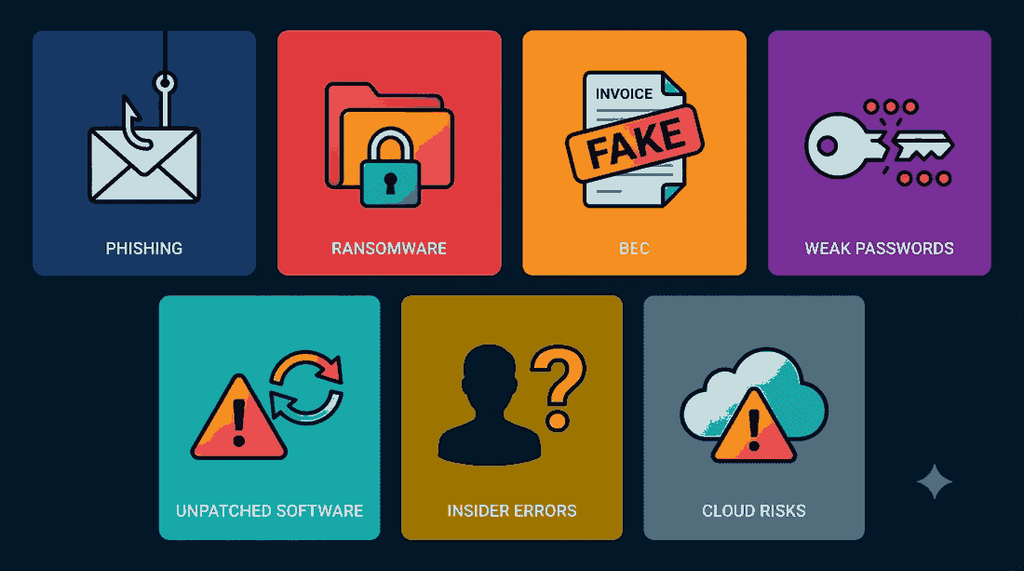
Understanding modern attack vectors makes it easier to direct your defensive resources effectively.
Phishing Emails
Phishing involves fraudulent communications designed to appear legitimate—often impersonating banks, executive leadership, or known vendors. The objective is to manipulate an employee into clicking malicious links, entering credentials on fake portals, or running infected attachments.
Ransomware
Ransomware infects systems, encrypts critical files, and demands payment for the decryption key. For a small business, system downtime combined with data loss can bring operations to an immediate halt.
Business Email Compromise (BEC)
In a BEC attack, a criminal compromises or spoofs a legitimate corporate email account to request unauthorized fund transfers or fraudulent changes to vendor banking details. Because the email appears authentic, staff often follow instructions without verification.
Weak or Reused Passwords
Simple, reused, or shared credentials represent an open door for automated credential-stuffing attacks. If an employee uses identical passwords across personal and work accounts, a breach on an external site directly compromises corporate infrastructure.
Unpatched Software Flaws
Developers regularly release updates to close newly identified security gaps. When companies delay updates, those vulnerabilities remain exposed. A high percentage of successful exploits target flaws for which patches were available months prior.
Insider Errors
Not every incident involves external malicious intent. Accidental misdirection of sensitive emails, lost laptops lacking disk encryption, or inadvertent permission misconfigurations frequently result in severe data exposures.
Remote Work and Cloud Vulnerabilities
As distributed teams adopt cloud platforms, company data fragments across residential Wi-Fi networks, mobile phones, and unvetted third-party apps, expanding the overall attack surface.
The Real Cost of Inaction: Why Waiting Is Expensive
Many organizations postpone security investments because they view cybersecurity as an overhead cost without immediate ROI. However, incident recovery costs consistently dwarf preventative spending.
Financial Destruction
Direct costs escalate rapidly: forensic investigations, extortion demands, legal representation, data recovery services, and statutory fines for non-compliance. A single breach can eliminate an SME’s annual profit margin.
Operational Downtime
When systems lock, order processing, customer support, invoicing, and inventory management halt. Every hour of disruption directly decreases top-line revenue.
Permanent Loss of Customer Trust
Clients entrust your business with confidential data. If sensitive records leak, customer attrition spikes, and winning back lost trust is exceptionally difficult.
Reputational Damage
News of security failures travels rapidly across social platforms and industry networks, jeopardizing contract renewals and prospective sales conversations.
Regulatory Penalties
Data protection regulations (such as GDPR, CCPA, or regional privacy mandates) legally require businesses to safeguard consumer information and report breaches promptly. Regulators penalize non-compliance regardless of enterprise revenue.
Reactive vs. Proactive Security: A Direct Comparison
| Feature | Reactive Security Approach | Proactive Threat Management |
| Trigger Point | Acts only after an attack happens | Identifies risks before exploitation |
| Detection Speed | Often detects breaches weeks or months late | Identifies suspicious activity immediately |
| Recovery Costs | High emergency response & recovery fees | Predictable, low ongoing maintenance costs |
| System Downtime | Days to weeks of operational outages | Minimal disruption; quick containment |
| Business Impact | High stress, loss of client trust | Stable operations, verified partner trust |
10 Core Pillars of a Proactive Threat Management for SEMs Strategy
Building a proactive posture does not require complex tooling immediately. Start with these ten operational foundations:
1. Maintain an Accurate Asset Inventory
You cannot protect assets you cannot see. Document every device, workstation, mobile phone, server, cloud account, and database connected to your business network.
2. Conduct Regular Risk Assessments
Audit your digital environment at least annually, and whenever deploying significant software or infrastructure changes, to locate newly introduced weaknesses.
3. Enforce Automatic Patch Management
Configure automatic updates across operating systems, browsers, office software, and network routers. Prompt patching eliminates known vulnerabilities before exploit kits can leverage them.
4. Require Multi-Factor Authentication (MFA)
Deploy MFA across email, cloud drives, VPNs, and financial platforms. Even if credentials are breached, an additional authentication factor stops attackers from logging in.
5. Deliver Regular Employee Awareness Training
Human error remains a primary ingress point. Provide short, practical training sessions on recognizing social engineering, phishing markers, and safe browsing habits. Encourage blameless reporting when mistakes occur.
6. Implement Continuous Monitoring
Network intrusions often go unnoticed for months. Use monitoring agents or partner with a Managed Security Service Provider (MSSP) to detect unauthorized configuration changes or abnormal data exfiltration 24/7.
7. Maintain Isolated Backups (3-2-1 Rule)
Keep three copies of your critical data on two distinct media types, with at least one copy stored completely offline or off-site. Routinely run restoration tests to ensure backup integrity.
8. Enforce the Principle of Least Privilege
Restrict employee access permissions strictly to what is required for their day-to-day duties. If an entry-level account is compromised, compartmentalized permissions prevent lateral network movement.
9. Document an Incident Response Plan
During a breach, panic leads to mistakes. Maintain a physical and digital playbook answering:
- Who must be notified immediately?
- Who has authorization to take compromised systems offline?
- How will internal and external communications be handled?
- What are the procedures for restoring data securely?
10. Assess Vendor and Supply Chain Risks
Confirm that third-party contractors and SaaS vendors adhere to baseline security standards. If an integrated vendor is compromised, your connected workflows become vulnerable.
Frequently Asked Questions
What is proactive threat management?
Proactive threat management is the practice of identifying, evaluating, and mitigating cyber vulnerabilities before malicious actors exploit them. It combines vulnerability patching, 24/7 monitoring, access controls, and workforce training.
Why do cybercriminals target small businesses?
Small businesses hold valuable customer records and financial data, yet often lack dedicated security teams, making them easier and faster to compromise than hardened enterprise targets.
How much does proactive cybersecurity cost for an SMEs?
Baseline controls—including MFA, automatic patching, least privilege policies, and employee training—cost very little to implement. Small businesses can also outsource monitoring to an MSSP for a predictable monthly fee, which is significantly cheaper than breach remediation.
Is antivirus software enough to protect a small business?
No. Standard antivirus detects known malicious files, but cannot block credential theft, social engineering, insider errors, or zero-day vulnerabilities. True defense requires layered security.
How often should an SME conduct a security review?
Review core configurations (access lists, backup integrity, updates) monthly, and run an in-depth security risk assessment at least once per year or whenever introducing major IT changes.
Secure Your Business Before Threats Materialize
Cybersecurity risks are no longer exclusive to multinational corporations. For small and medium enterprises, threat management is an operational necessity for business continuity.
Proactive security is not about running a fear-driven operation; it is about building resilience. You do not need to deploy every enterprise tool immediately. Start small: implement multi-factor authentication, isolate your backups, train your staff, and monitor your critical systems.
Need help identifying vulnerabilities in your environment? Contact our cybersecurity specialists today to schedule your comprehensive security assessment.
