
What Is DevOps? A Plain-English Guide for Business Owners and Startups.
What Is DevOps? A Plain-English Guide for Business Owners and Startups
If you run any business or startup, you have probably heard the word “DevOps” in a meeting, on a job board, or from a developer who sounds very excited about it. But what does it actually mean? And more importantly, does it matter for your business?
The short answer is yes. DevOps can help you launch products faster, reduce costly errors, and keep your customers happy. This guide explains what DevOps is, why it matters, and how you can start using it, all in simple language and without confusing jargon.
What Is DevOps?
Dev stands for Development. These are the people who design and write the code. Ops stands for Operations. These are the people who keep the software running smoothly after it goes live. DevOps is a way of working that helps a company build and improve its apps and websites much faster. It combines good team habits, smart methods, and helpful tools. Because the work moves quicker, the company can give customers better service sooner and stay ahead of its competitors.
How DevOps Works?
DevOps works by getting the people who build an app and the people who run it to work as one team. They write small updates, test them automatically, and release them to users in quick steps. Special tools watch the app all the time, so any problem is caught early and fixed fast. Then the team learns from customer feedback and repeats the cycle, which makes the product a little better each time.
A Real-Life Example Everyone Can Understand
Imagine a busy restaurant.
The chefs create the dishes, just like developers create software. The waiters and managers serve the food and keep customers happy, just like the operations team keeps the software running. Now imagine the chefs never talk to the waiters. A chef cooks a dish that takes 40 minutes, but the waiter promises the customer it will arrive in 10. The result is an angry customer, a stressed kitchen, and a bad review. Now imagine the chefs and waiters meet every day. They share feedback, plan the menu together, and warn each other about problems before they happen. Orders go out faster, mistakes drop, and customers come back again and again.
That is exactly what DevOps does for a software business. It replaces confusion and blame with communication and teamwork.
Key Business Benefits of DevOps?
You don’t need a technical background to see the ROI of DevOps. At its core, DevOps transforms how your company delivers value to customers:
1. Faster Product Releases
Instead of waiting months for one big update, DevOps helps teams release small improvements quickly, sometimes several times a day. This means you can respond to customer feedback faster and stay ahead of your competitors.
2. Fewer Errors and Less Downtime
Automated testing catches problems before customers see them. When something does go wrong, monitoring tools alert the team right away, so the issue is fixed in minutes instead of hours.
3. Lower Costs
Automation reduces repetitive manual work. Fewer mistakes mean less money spent on emergency fixes, refunds, and lost sales. Your team also spends more time building new features and less time fighting fires.
4. Happier Customers
A website or app that loads quickly, stays online, and improves regularly builds trust. Happy customers stay longer, spend more, and recommend your brand to others.
5. Better Teamwork and Morale
When everyone shares responsibility for the final result, there is less blame and more problem-solving. Teams that work well together are also more likely to stay with your company.
6. Stronger Security
Security checks can be built into every step of the process instead of being added at the end. This helps protect your customer data and your reputation.
The Core Principles of DevOps
DevOps is not just a tool you can buy. It is a culture supported by good habits. These are the main ideas behind it.
Collaboration. Developers, testers, operations staff, and even business teams communicate openly and work toward shared goals.
Automation. Repetitive tasks, such as testing, building, and deploying software, are handled by tools instead of people. This saves time and reduces human error.
Continuous Improvement. Teams regularly review what worked, fix what did not, and get better with every cycle.
Fast Feedback. Problems are found early, when they are cheap and easy to fix. Customer feedback is also collected quickly and used to guide the next update.
Customer Focus. Every decision is made with the end user in mind. If a change does not help the customer, it is questioned.
Shared Responsibility. Instead of saying “that is not my job,” everyone takes ownership of the product from start to finish.
Key DevOps Terms Explained Simply
You will hear these terms often. Here is what they mean in plain English.
| Term | Simple Meaning |
|---|---|
| CI (Continuous Integration) | Developers regularly combine their code in one place, and it is tested automatically each time. |
| CD (Continuous Delivery or Deployment) | New updates are prepared and released to users quickly and safely. |
| Infrastructure as Code (IaC) | Servers and systems are set up using written instructions instead of manual clicks. |
| Pipeline | A series of automatic steps that takes code from a developer’s laptop to the live product. |
| Containers | Small packages that hold software and everything it needs, so it runs the same way everywhere. |
| Monitoring | Tools that watch your app around the clock and alert the team if something goes wrong. |
| Cloud | Renting computing power from providers like AWS, Google Cloud, or Microsoft Azure instead of buying your own servers. |
| DevSecOps | DevOps with security built into every stage of the process. |
How Does the DevOps Process Work?
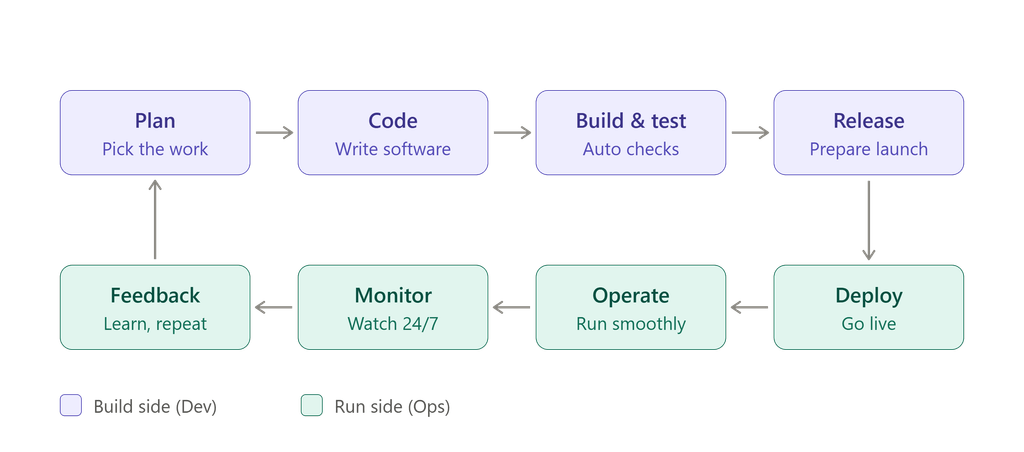
DevOps follows a continuous loop. Think of it as a circle that never stops improving.
- Plan: Decide what to build, improve, or fix.
- Code: Developers write the software.
- Build and Test: The code is combined and checked automatically for bugs.
- Release: The update is prepared for launch.
- Deploy: The update goes live for users.
- Operate: The team keeps the system running smoothly.
- Monitor: Tools track performance and collect feedback.
- Repeat: Feedback leads to new plans, and the cycle begins again.
Because each loop is small, problems stay small too. This is one of the biggest reasons DevOps teams are faster and more reliable than traditional teams.
A Simple Before and After Comparison
To see the difference clearly, imagine a small online shop that wants to add a new payment option.
Without DevOps: The developer builds the feature over six weeks. It is then handed to the operations team, who find that it does not work on the live servers. Both teams spend two more weeks arguing and fixing. The launch happens on a Friday night, the website crashes, and customers cannot check out.
With DevOps: The developer and the operations engineer plan the feature together. The code is tested automatically every day. A small version is released to a few customers first. Monitoring tools show that everything works, so the feature is rolled out to everyone, and no one loses sleep.
The feature is the same. The result is very different.
Popular DevOps Tools (You Do Not Need to Learn Them All)
Your technical team will choose the tools that fit your needs. Still, it helps to know a few common names so you can follow the conversation.
- Git and GitHub: For storing and managing code, and tracking every change.
- Jenkins, GitLab CI, and GitHub Actions: For automating builds, tests, and releases.
- Docker: For packaging software so it runs the same way on every computer.
- Kubernetes: For managing many software containers at once.
- Terraform and Ansible: For setting up and managing infrastructure using code.
- Prometheus and Grafana: For monitoring systems and building easy-to-read dashboards.
- Slack and Jira: For communication and task tracking.
Remember that tools are only helpers. A good culture with simple tools will always beat a poor culture with expensive ones.
Is DevOps Only for Big Companies?
No, and this is one of the most common myths. In fact, startups often gain the most from DevOps for several reasons:
- They need to move fast and test ideas quickly.
- Their budgets are limited, so avoiding costly mistakes is very important.
- Their teams are small, so automation saves valuable time.
- They can build good habits from day one instead of changing old ones later.
Even a team of three people can use basic DevOps habits, such as automated testing, version control, and simple cloud deployment, to work smarter and grow faster.
DevOps vs. Agile: What Is the Difference?
Many people confuse these two terms, but they are different.
Agile focuses on how teams plan and build software in small steps, with regular feedback from customers.
DevOps goes further. It covers how that software is tested, released, and maintained after it is built.
You can think of Agile as helping you build the right product, and DevOps as helping you deliver and run it reliably. They work very well together, and many successful companies use both.
DevOps vs. DevSecOps
DevSecOps is simply DevOps with a stronger focus on security. Instead of checking for security problems at the very end, teams test for them at every stage. This is especially important if your business handles payments, personal data, or health information.
If your startup collects customer data of any kind, adding security habits early will save you from serious trouble later.
Common DevOps Mistakes to Avoid
Many teams struggle with DevOps because of avoidable mistakes. Watch out for these.
- Treating DevOps as only a tool. Without teamwork and the right mindset, tools alone will not solve your problems.
- Trying to change everything at once. Start small and grow step by step.
- Ignoring security. Build safety into every stage instead of leaving it for the end.
- Skipping training. Your team needs time and support to learn new ways of working.
- Not measuring results. Without numbers, you cannot know what is improving.
- Keeping teams in separate silos. If developers and operations still do not talk, you are not really doing DevOps.
- Automating a bad process. Fix the process first, then automate it.
How to Get Started With DevOps
You do not need a big budget or a large team. Follow these simple steps.
- Understand your current process. Write down how an idea becomes a live feature today. Where are the delays and problems?
- Set clear goals. For example, “Release updates twice as fast” or “Reduce downtime by half.”
- Start with one small project. Test DevOps practices on a single product or feature before applying them everywhere.
- Use version control. Store all your code in a tool like Git so every change is tracked.
- Automate the basics. Begin with automated testing and simple deployment.
- Choose the right cloud platform. Pick one that fits your size, skills, and budget.
- Add monitoring early. Know when something breaks before your customers tell you.
- Hire or consult experts if needed. A DevOps consultant can save you months of trial and error.
- Review and improve regularly. Hold short review meetings, celebrate small wins, and learn from mistakes.
How to Measure DevOps Success
Good teams track their progress with numbers. These four simple measures are widely used.
- Deployment Frequency: How often do you release updates?
- Lead Time: How long does it take for an idea to go live?
- Change Failure Rate: How often do updates cause problems?
- Recovery Time: How quickly can you fix issues when they happen?
If the first two numbers go up and the last two go down, your DevOps efforts are working. You do not need to be perfect. You only need to see steady improvement over time.
DevOps Roles and Careers
As DevOps grows, many companies hire people with special skills to guide the process. You may see job titles such as:
- DevOps Engineer: Builds and manages the automation and deployment pipeline.
- Site Reliability Engineer (SRE): Focuses on keeping systems stable and fast.
- Cloud Engineer: Designs and manages cloud infrastructure.
- Release Manager: Plans and coordinates software releases.
- DevSecOps Engineer: Makes sure security is part of every step.
For a small startup, one skilled person may handle several of these tasks. As your company grows, you can build a dedicated team.
Should You Hire a DevOps Engineer or Use a Consultant?
This depends on your stage and budget.
Hire a full-time engineer if your product is growing fast, your software changes every week, and you need someone who knows your system deeply.
Use a consultant or agency if you are just starting, need a one-time setup, or want expert advice without a full-time salary.
Many startups begin with a consultant to set up a strong foundation and then hire a full-time engineer once the business grows.
Real Benefits You Can Expect
When a business adopts DevOps in the right way, these results are common:
- Shorter time between an idea and a live feature
- Fewer outages and faster recovery when problems appear
- Lower cloud and maintenance costs through better resource use
- Less stress for developers and support teams
- More time to focus on customers instead of fixing mistakes
Results vary from company to company, but the direction is almost always positive when the basics are done well.
Frequently Asked Questions (FAQs)
What does DevOps mean in simple terms?
DevOps is a method that brings software developers and IT operations teams together so they can build, test, and release software faster and with fewer problems.
Is DevOps a job role or a methodology?
Both. It is mainly a culture and a set of practices, but many companies also hire DevOps Engineers to guide and manage the process.
Does my small business need DevOps?
If your business relies on a website, an app, or a software product, DevOps can help you deliver better service with less stress and lower costs.
How much does DevOps cost?
It depends on your size and needs. Many open-source tools are free, and cloud services usually follow a pay-as-you-use model, which suits startups well. The biggest cost is usually the time needed to learn and set things up.
How long does it take to see results?
Many teams notice improvements within a few months, especially in release speed and the number of errors. Deeper cultural change can take a year or more.
Do I need to be technical to understand DevOps?
No. As a business owner, you only need to understand the goals: faster delivery, fewer problems, and happier customers. Your technical team can handle the details.
Is DevOps the same as cloud computing?
No. Cloud computing is where your software runs, while DevOps is how your team builds and manages it. The two often go together, but they are not the same thing.
Can DevOps work for non-software businesses?
Yes. Any business that uses digital tools, such as an online store, a booking system, or a mobile app, can benefit from DevOps practices.
Final Thoughts
DevOps is not magic, and it is not only for tech giants. It is simply a smarter, friendlier way for teams to build and run software together. For business owners and startups, it means faster launches, fewer headaches, lower costs, and happier customers.
You do not need to change everything overnight. Start with one small step, such as automating your tests or improving communication between your teams. Measure your progress, learn from every mistake, and keep improving.
Over time, DevOps can become one of the strongest foundations for your business growth. The sooner you begin, the sooner you will enjoy the benefits.
