
How Automated DevOps Support and CI/CD Pipelines Accelerate Software Development
How Automated DevOps Support and CI/CD Pipelines Accelerate Software Development
There was a time when releasing software felt like launching a rocket. Weeks of preparation, a late-night war room, a long checklist, and a lot of crossed fingers. If something broke in production, everyone scrambled, and the blame game started before the fix did.
Most modern teams no longer work that way, and the reason is simple: they automated the boring, risky, repetitive parts of delivery. Automated DevOps support, CI/CD pipelines, and broader DevOps automation have quietly become the engine behind the fastest software companies in the world. They are why some teams deploy dozens of times a day while others still struggle to ship once a month. That gap comes down to software development speed, and software development speed comes down to deployment automation.
In this guide, we will walk through what continuous integration, continuous delivery, and DevOps automation actually are, how they improve software development speed in real terms, which tools and DevOps best practices matter most, and how you can start building a faster, safer delivery process, even if your team is small.
What Is Automated DevOps Support?
DevOps is the practice of bringing development and operations together so software can be built, tested, released, and maintained as one continuous flow rather than a series of handoffs. Automated DevOps support takes that idea further by using tools, scripts, and intelligent monitoring to handle the work humans used to do by hand.
Think of it as a set of dependable assistants working in the background. They build your code when someone pushes a change. They run your tests. They provision servers. They watch your application for trouble and alert the right person before customers notice. In many cases, they even fix common problems on their own.
Automated DevOps support usually covers areas like:
- Build and test automation: compiling code and running checks without manual effort.
- Infrastructure as code: defining servers, networks, and databases in version-controlled files so environments can be created in minutes.
- Configuration management: keeping every environment consistent so “it works on my machine” stops being an excuse.
- Monitoring and alerting: tracking performance, errors, and uptime around the clock.
- Incident response automation: triggering rollbacks, restarts, or scaling when something goes wrong.
- Security and compliance checks: scanning code and dependencies automatically on every change.
The goal is not to replace engineers. It is to remove the friction that keeps them from doing their best work. Done well, DevOps automation is one of the most reliable ways to raise software development speed without cutting corners.
Understanding CI/CD Pipelines in Plain Language
CI/CD stands for continuous integration and continuous delivery (or continuous deployment). CI/CD pipelines are the backbone of automated software delivery and modern deployment automation.

Continuous Integration (CI)
Continuous integration means developers merge their code into a shared repository frequently, often several times a day. Every time they do, an automated process builds the application and runs a suite of tests. If something fails, the team knows within minutes, while the change is still fresh in the developer’s mind.
Without CI, teams tend to work in isolation for days or weeks and then try to combine everything at the end. That moment, often called “integration hell,” is where conflicts, hidden bugs, and missed deadlines pile up.
Continuous Delivery and Continuous Deployment (CD)
Continuous delivery extends continuous integration by automatically preparing every successful build for release. The code is packaged, tested in staging environments, and kept in a deployable state at all times. A human may still press the final button.
Continuous deployment goes one step further than continuous delivery. Every change that passes all automated checks is released to production automatically, with no manual approval. Companies with mature testing and monitoring often choose this route because it removes the last bottleneck.
What a Typical Pipeline Looks Like
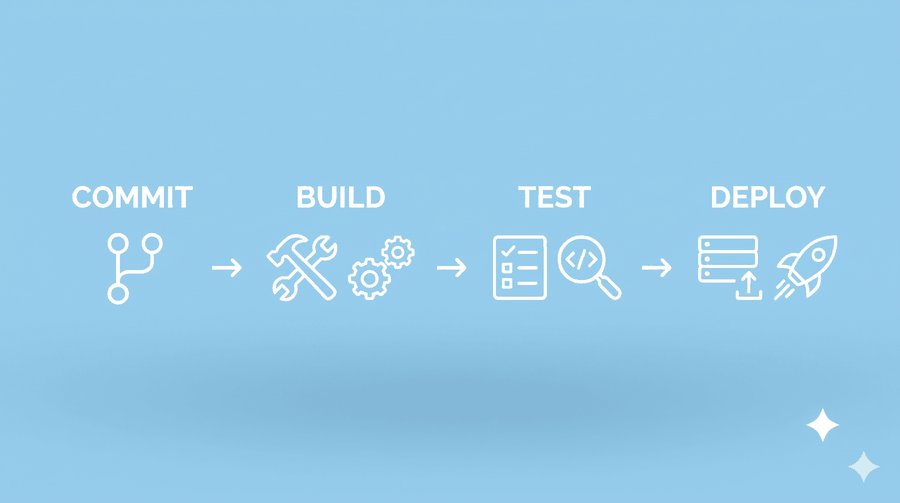
A simple pipeline might move through these stages:
- A developer commits code to the repository.
- The pipeline builds the application.
- Unit and integration tests run automatically.
- Security and quality scans check the code and its dependencies.
- The build is deployed to a staging environment.
- Automated end-to-end tests verify real user flows.
- The release goes to production, either on approval or automatically.
- Monitoring confirms the release is healthy and can trigger a rollback if it is not.
Each step is a gate. If a change cannot pass, it never reaches your users. That is deployment automation at work: the same dependable process, every single time.
Why Speed Matters in Software Development
Software development speed is not about rushing. It is about shortening the time between having an idea and learning whether it works. The faster you can put a change in front of real users, the faster you can learn, adjust, and improve.
Research from the DevOps community over the years, including the widely cited DORA metrics, has consistently linked high-performing teams to four measurable outcomes: frequent deployments, short lead time from commit to production, a low change failure rate, and fast recovery when something breaks. Notably, the teams that ship faster also tend to be the ones with fewer failures. Speed and stability are not opposites. CI/CD pipelines and DevOps automation are what let you have both.
How CI/CD Pipelines Accelerate Software Development
Let us look at the specific ways CI/CD pipelines and DevOps automation improve software development speed in day-to-day work.
1. Faster Feedback Loops
When a developer finds out about a bug five minutes after writing the code, fixing it takes a few minutes. When they find out five weeks later, they have to remember what they were thinking, trace the problem through other people’s changes, and often rework the whole feature.
Continuous integration pipelines shrink that feedback loop dramatically. Tests run on every commit, so problems surface immediately. Shorter loops mean fewer wasted hours and far less context switching.
2. Smaller, Safer Releases
Manual release processes are painful, so teams batch up changes and release rarely. Large releases carry large risk because dozens of changes land at once, and when something breaks, nobody knows which change caused it.
A CI/CD pipeline turns releasing into routine deployment automation, which encourages small, frequent updates. Small changes are easier to review, easier to test, and easy to roll back. If something goes wrong, the culprit is obvious.
3. Fewer Human Errors
People are creative and insightful, but we are poor at repeating the same twenty-step process perfectly every time. Someone forgets a configuration flag, deploys the wrong branch, or skips a test because the deadline is close.
Automation does the same thing the same way every time. Once deployment automation is scripted and tested, releasing becomes boring in the best possible sense. Boring deployments are reliable deployments.
4. Consistent Environments
A surprising amount of lost time comes from environment differences. The code works in development, fails in staging, and behaves strangely in production because each environment was set up slightly differently.
Infrastructure as code and containerization tools solve this by defining environments in files that anyone can read, review, and recreate. Spinning up a new test environment goes from a multi-day ticket to a few minutes of automated work.
5. Parallel Work Without Chaos
In a growing team, many people change the codebase at the same time. Without automation, coordinating those changes depends on meetings, manual reviews, and luck.
A good pipeline acts as a neutral referee. Every change, no matter who wrote it, faces the same checks. Developers can work in parallel with confidence, knowing the pipeline will catch conflicts and regressions early. This is one of the main reasons CI/CD pipelines scale well as teams grow.
6. Built-In Quality and Security
Security used to be a final inspection step, which meant vulnerabilities were found late and fixed at high cost. Modern pipelines practice what is often called “shifting left,” running static analysis, dependency scanning, Security scanning, and secret detection on every commit.
The same applies to code quality. Linting, formatting checks, and test coverage thresholds can be enforced automatically, so code reviews can focus on design and logic instead of style arguments.
7. More Time for Meaningful Work
Perhaps the biggest gain is human. Every hour an engineer spends babysitting a deployment or manually checking servers is an hour not spent building features, improving performance, or solving customer problems.
Automation gives that time back. Teams often report higher morale too, because nobody enjoys a midnight release that might go wrong. When deployment becomes a routine, low-stress event, people can focus on craft.
The Role of Automated DevOps Support After Deployment
Shipping fast is only half the story. Software has to keep running, and that is where automated DevOps support earns its keep.
Proactive Monitoring and Alerting (round-the-clock monitoring)
Modern monitoring tools collect metrics, logs, and traces from every part of your system. Instead of waiting for a customer to complain, you set thresholds and anomaly detection that notify the right engineer as soon as something looks off. Good alerting is selective, because too many noisy alerts train people to ignore them.
Automated Rollbacks backup and Self-Healing
If a new release causes error rates to spike, an automated system can roll back to the previous version in seconds. Container orchestration platforms can also restart failed services and scale capacity up or down based on demand without anyone lifting a finger. This dramatically reduces mean time to recovery.
Smarter Incident Management
Automated DevOps support helps during an incident too. It can page the on-call engineer, open a communication channel, attach relevant logs and recent deployments, and track the timeline for a later review. When the incident is over, the data is already collected for a blameless postmortem, which helps the team learn rather than repeat mistakes.
Cost and Capacity Management
Automated scaling and scheduled shutdown of unused environments can cut cloud bills significantly. Automated DevOps support does not just protect uptime; it protects your budget as well.
Popular Tools for CI/CD and DevOps Automation
There is no single perfect stack for DevOps automation, and the right choice depends on your team size, budget, and existing technology. Here are some of the most widely used categories and examples:
- CI/CD platforms: GitHub Actions, GitLab CI/CD, Jenkins, CircleCI, Azure DevOps, and Bitbucket Pipelines.
- Containers and orchestration: Docker and Kubernetes.
- Infrastructure as code: Terraform, Pulumi, and AWS Cloud Formation.
- Configuration management: Ansible, Chef, and Puppet.
- Monitoring and observability: Prometheus, Grafana, Datadog, and New Relic.
- Security scanning: Snyk, SonarQube, and Trivy.
- Deployment strategies: Argo CD and Flux for GitOps-style delivery.
A useful rule of thumb: start with the tools your team already knows and the platform your code already lives on. A simple pipeline that people actually use beats a sophisticated one that nobody understands.
DevOps Best Practices for Building an Effective CI/CD Pipeline
Adopting the tools is the easy part. Getting real value from your CI/CD pipelines depends on DevOps best practices and good habits.
Keep the Pipeline Fast
A pipeline that takes an hour to run will be ignored or bypassed. Aim for fast feedback, ideally under ten minutes for the core checks. Run tests in parallel, cache dependencies, and split slow end-to-end tests into a separate stage.
Treat Everything as Code
Store your pipeline definitions, infrastructure, and configuration in version control. This gives you history, peer review, and the ability to reproduce anything from scratch.
Invest in Good Tests
Automation is only as trustworthy as your tests. Build a healthy mix: many fast unit tests, a reasonable number of integration tests, and a small set of end-to-end tests covering critical user journeys. Fix or delete flaky tests quickly, because they erode trust in the whole system.
Make Failures Visible and Actionable
When a build fails, the message should tell developers exactly what went wrong and where. Notify the right people through the channels they actually use, and make fixing a broken build the team’s top priority.
Use Progressive Delivery
You do not have to release to everyone at once. Techniques such as feature flags, canary releases, and blue-green deployments let you expose a change to a small percentage of users first, watch the results, and then expand. This keeps risk low while still moving quickly, which is the real promise of continuous delivery.
Build Security In From the Start
Scan dependencies, manage secrets properly, and apply the principle of least privilege to your pipeline itself. A compromised pipeline is a direct route into production, so protect it accordingly.
Measure What Matters
Track deployment frequency, lead time for changes, change failure rate, and time to restore service. These metrics show whether your investment is paying off and where the next bottleneck lives. Use them to improve the system, not to rank individuals.
Common Mistakes to Avoid
Even well-intentioned teams stumble. Watch out for these pitfalls:
- Automating a broken process. If your manual process is confusing, automating it only makes the confusion faster. Simplify first.
- Trying to do everything at once. Big-bang transformations often stall. Start with one service or team and expand.
- Ignoring culture. DevOps is as much about collaboration and shared ownership as it is about tooling. Silos will undermine the best pipeline.
- Skipping documentation. Automation can become a black box. Document how the pipeline works so new teammates can maintain it.
- Neglecting maintenance. Pipelines need updates, dependency upgrades, and occasional cleanup just like application code.
- Alert fatigue. Too many low-value alerts hide the important ones. Review and tune regularly.
A Realistic Example
Imagine a small e-commerce company with six developers. Before automation, they released once every three weeks. Each release required a staging freeze, a manual regression test, and a Saturday deployment. About one release in four caused a customer-facing problem, and fixing it meant another stressful weekend.
They started small. First, they adopted continuous integration, with automated builds and unit tests on every pull request. Within a month, broken code stopped reaching the main branch. Next, they added deployment automation by scripting releases and moved their infrastructure into code. Then they added basic monitoring with automated alerts and one-click rollbacks.
Six months later, they were releasing several times a week during normal working hours. Failed releases became rare, and when they did happen, a rollback took under a minute. The developers spent noticeably less time on release logistics and more time on features that customers had been requesting for months.
None of this required a huge budget or a specialist army. It required patience, a willingness to change habits, and a steady focus on removing one bottleneck at a time.
The Future: AI and Smarter Automation
The next wave of DevOps automation is already arriving. Intelligent tools can now suggest tests, flag risky changes based on historical data, detect anomalies that static thresholds would miss, and help engineers diagnose incidents faster by correlating logs and deployments. Platform engineering teams are also building internal developer platforms that give product teams self-service access to ready-made pipelines and environments.
These advances do not remove the need for good engineering judgment. They raise the ceiling on what a well-run team can achieve, especially if the fundamentals of solid CI/CD pipelines and DevOps best practices are already in place.
How to Get Started Today
If you are not sure where to begin, here is a practical path:
- Put everything in version control if you have not already.
- Automate your build and run a basic test suite on every commit.
- Add a staging environment that mirrors production as closely as you can.
- Script your deployments so releasing is a single, repeatable action.
- Add monitoring and alerts for the few metrics that matter most, such as errors, latency, and uptime.
- Introduce security scanning into the pipeline.
- Review your metrics regularly and fix the slowest or riskiest step first.
If your team lacks the time or experience, working with a managed DevOps provider can shorten the learning curve considerably. Many businesses choose automated DevOps support services to set up pipelines, monitor systems, and handle incidents so their developers can stay focused on the product.
Frequently Asked Questions
What is the difference between CI and CD?
Continuous integration focuses on automatically building and testing code every time it is merged. Continuous delivery builds on that by keeping every successful build ready to release, while continuous deployment releases each passing change to production automatically.
Do small teams really need CI/CD pipelines?
Yes. Small teams often benefit the most, because DevOps automation replaces tasks they simply do not have spare people to do. Even a basic pipeline with automated tests and deployment saves hours every week.
Does automation make software less secure?
Not when done well. Automated scanning on every change usually catches issues earlier and more consistently than occasional manual reviews. The pipeline itself must be secured, but that is a manageable task.
How long does it take to set up a CI/CD pipeline?
A simple pipeline can be running in a day or two. A mature setup with progressive delivery, security scanning, and full observability usually evolves over several months as the team learns what it needs.
Will automation replace DevOps engineers?
No. Automation handles repetitive tasks, but people are still needed to design systems, improve processes, respond to unusual incidents, and make judgment calls. The role shifts toward higher-value work.
How do I know if my CI/CD pipeline is working well?
Look at the four key metrics: deployment frequency, lead time for changes, change failure rate, and time to restore service. If the first two are improving while the last two are falling, you are on the right track.
Final Thoughts
Automated DevOps support and CI/CD pipelines are not a passing trend. They are the practical answer to a long-standing problem: how to deliver software quickly without sacrificing quality. By catching issues early, making releases small and routine, keeping environments consistent, and watching production around the clock, DevOps automation turns delivery from a source of stress into a competitive advantage and lifts software development speed.
You do not need to transform everything overnight. Pick one painful, manual step, automate it, measure the result, and move on to the next. Over time, those small improvements compound into a development process that is faster, calmer, and far more reliable.
The teams that win are rarely the ones working the longest hours. They are the ones who let machines handle the repetitive work so people can focus on what only people can do: solving problems and building things customers love.
Ready to speed up your software delivery? Talk to our DevOps team to learn how automated pipelines and round-the-clock DevOps support can help you ship better software, faster.
